> For the complete documentation index, see [llms.txt](https://docs.atlas.design/llms.txt). Markdown versions of documentation pages are available by appending `.md` to page URLs; this page is available as [Markdown](https://docs.atlas.design/atlas-ai-studio-overview/node-index/video-nodes.md).
# Video Nodes
Video Nodes generate video from text and reference images, and edit, extend, lipsync, and upscale existing clips.
Video Nodes generate short animated clips directly from text prompts and optional reference images.\
They are ideal for creating **cinematic previews**, **marketing videos**, **quick scene animations**, or **visual storytelling elements** within Atlas workflows.
Two nodes are available: a full-featured version and a simplified fast-generation version.
## When to use video nodes
Reach for video nodes when a static image isn't enough and a fully-rigged animation pipeline is overkill. Common use cases:
* **Marketing and trailers.** Generate cinematic clips from concept art for pitch decks, store listings, social media, or community announcements.
* **Cutscene prototyping.** Roughly visualize a cinematic before committing animator time to a polished version.
* **Animated moodboards.** Turn a single style reference into a short looping clip that conveys mood and motion direction to the team.
* **NPC and character animation prototyping.** Use Lipsync to put a generated voice on a static character portrait for dialogue review, or Reference to Video to test motion choreography against a character reference.
* **Video edits and continuations.** Use Video Edit to restyle existing footage and Video Extend to grow short clips into longer sequences without re-rendering.
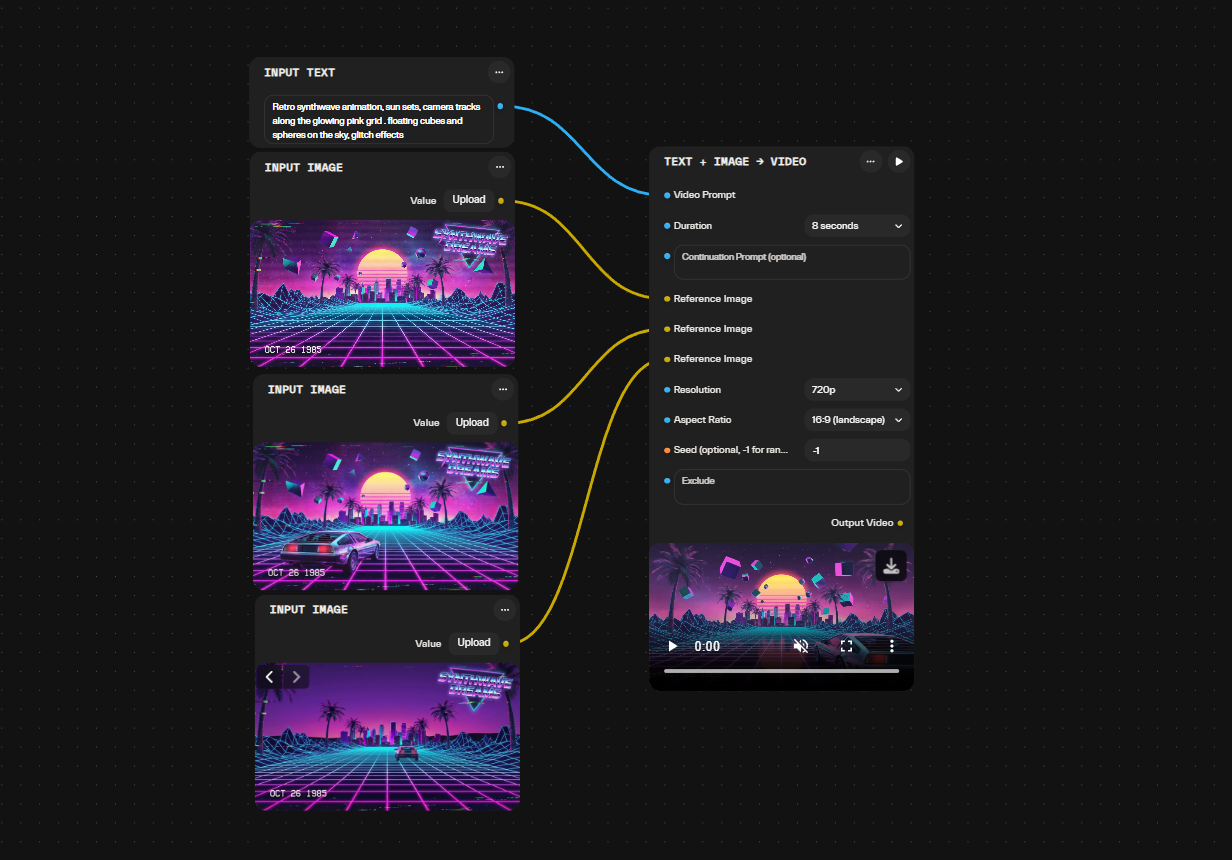
### Text + Image -> Video
Generates a video from a **text prompt**, an optional **continuation prompt**, and up to **three reference images**.
#### Inputs
* **Prompt** — main instruction for video content
* **Continuation Prompt** (optional) — describes how the animation should evolve
* **Reference Images** — up to **3** images to control style, subject, or composition
#### Video Settings
* **Duration:** 4, 6, 8, 16, 24, 32, or 40 seconds
* **Resolution:** 720p or 1080p
* **Aspect Ratio:** Landscape or Portrait
#### Output
* A rendered video clip in the chosen format
This node is suited for more controlled, style-specific video generation, especially when reference images are important.
#### Example Usecase
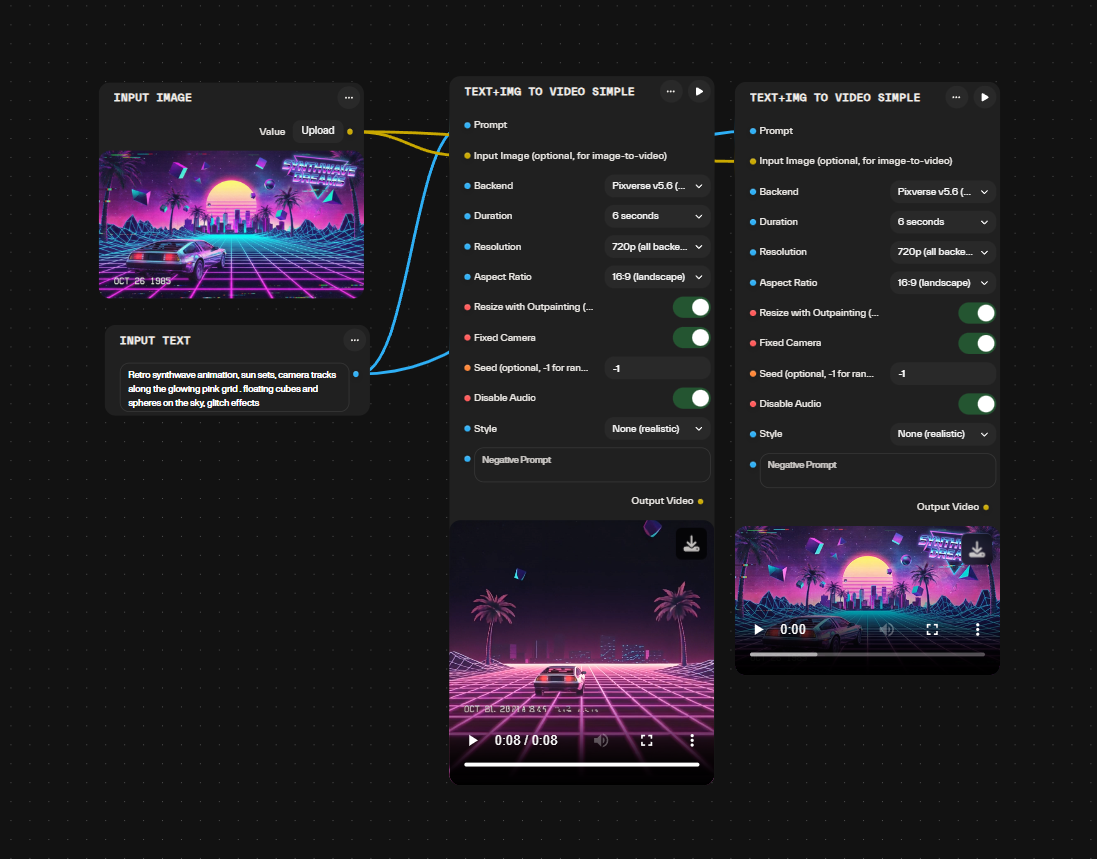
### Simple Text + Image -> Video
A streamlined version optimized for **fast, lightweight video generation**.
#### Inputs
* **Prompt** — primary description
* **Input Image** (optional) — style or subject reference
#### Video Settings
* **Duration:** 5, 10, or 12 seconds
* **Resolution:** 420p, 720p, or 1080p
* **Aspect Ratio:** Landscape, Portrait, Standard, or Square
* **Fixed Camera Position:** enable or disable
* **Seed:** control variation (`-1` = random)
#### Output
* A quick-rendered video clip
This version is ideal for rapid prototyping or generating simple animated assets for marketing or social media.
#### Example Usecase
* **End Image** input — provides control over both the start and end frames of the generated video clip.
### Use Cases
* Marketing videos from a single concept image
* Animated moodboards
* Scene previews for game or environment design
* Quick animations for pitch decks or client presentations
* Stylized loops for social media
Video Nodes provide a fast way to bring static concepts to life using text prompts and reference imagery.
### Video Edit
Transforms an existing video by applying a new creative direction or environment using a reference image and text prompt.
**Inputs**
* **Source Video** — the original video clip to transform
* **Reference Image** — visual guide for the target style, environment, or look
* **Prompt** — text description of the desired edit
**Parameters**
* **Backend selector** — choose motion-path generation method (some backends use prompt-based motion, others use reference-driven paths)
* **Seed** — control variation (`-1` = random)
**Output**
* Edited video clip matching the reference image style and prompt direction
**Useful for:** changing the setting or atmosphere of placeholder footage, creating environmental variations of cutscenes, or adapting generic vehicle or character animations into themed game contexts (expedition tours, combat zones, fantasy landscapes).
* Accepts input videos from 3 to 60 seconds in length
* Supports up to 5 reference images
* Output resolution selectable as 720p or 1080p
* Audio handling mode: automatic or original (preserve source audio)
* Some backends support instruction-based edits with optional style reference image
* Supports style transfer driven by a reference video in addition to reference images
* Supports placing synchronized sound effects onto a video
* Supports 4–30 second clip durations with some backends
* Some backends support optional audio generation on edited output
* Some backends accept image, video, or audio references
* Some backends support non-celebrity face references after explicit confirmation
* Music generation mode can infer style from the video when no prompt is supplied, with an option to preserve the original speech or vocals under the new soundtrack
* Sound effect generation can infer effects from the video when no prompt is supplied
* Sound generation accepts sound direction with a chosen output duration or a "Match Input Video" option, up to 60 seconds
* Sound generation processes up to the first 60 seconds of a longer video
### Video Extend
Extends an existing video clip forward in time by generating additional frames based on a text prompt and the final frames of the input.
**Inputs**
* **Source Video** — the video clip to continue
* **Prompt** — text description guiding the extended footage
* **Backend selector** — choose generation engine (different backends produce varying motion styles and continuation approaches)
**Parameters**
* **Duration** — length of the extension (available durations depend on the selected backend)
* **Resolution** — output resolution (options vary by backend)
* **Seed** — control variation (`-1` = random)
**Output**
* Extended video clip appended to the original
**Useful for:** creating longer cutscene sequences from short generated clips, looping environmental footage, or prototyping extended NPC actions and vehicle animations without re-rendering the entire scene.
* Extension durations from 4 to 30 seconds are available with some backends
* Optional audio generation for the extended footage is available with some backends
* Image, video, or audio references can guide the extension with some backends
* Face references depicting non-celebrity likenesses can guide the extension with some backends, subject to explicit confirmation
### Seedance Reference to Video
Generates video content by combining multiple reference inputs—images, video clips, and audio—with a text prompt to produce a cohesive animated result.
**Inputs**
* **Prompt** — text description guiding the generation
* **Reference Images** — up to 9 still images for style, character, or environment guidance
* **Reference Videos** — up to 3 video clips (e.g., motion choreography, background loops, camera movement)
* **Reference Audio** — up to 3 audio clips to influence pacing, rhythm, or mood
**Parameters**
* **Seed** — control variation (`-1` = random)
**Output**
* Generated video clip synthesizing all provided references
**Useful for:** creating NPC dance sequences synced to in-game music, generating character performances driven by reference choreography, or producing cutscene animations that blend concept art, motion samples, and soundtrack cues.
* **Resolution** — output resolution selectable from 480p to 1080p
* Selectable backend models are available for generation beyond the default backend.
* Additional selectable backend models are available for generation, each accepting image, video, and audio references at resolutions from 480p to 1080p.
### Lipsync
Synchronizes a character's mouth movements to match an audio track, producing a video of the character speaking the provided dialogue or narration.
* **Video Input** — the character or face video to animate
* **Audio Input** — the speech or dialogue track to sync
* **Backend Selection** — four selectable backends, each with different processing characteristics
* **Output** — a lip-synced video clip with matching mouth movements
* Requires a clearly visible speaker facing the camera during the audio timeframe
* Best used with close-up or medium shots where facial features are distinct
### Upscale Video
Increases the resolution of an input video to produce sharper, higher-fidelity output from lower-resolution source clips.
* **Video input.** Accepts an existing clip as the source for upscaling.
* **Video output.** Returns the upscaled clip at increased resolution.
* **Resolution ceiling.** Upscales output up to 1080p at 30fps.
* **Preserves timing.** Frame count and duration of the source are retained; only spatial resolution is increased.
* **Typical use.** Finalize prototyped or generated footage for trailers, store listings, and cutscene review at higher fidelity.
Useful for: promoting rough or low-resolution generated clips to presentation quality without re-rendering the original video.
## Common pitfalls
* **Mismatched aspect ratio across reference images.** When supplying multiple reference images to the Text + Image -> Video node, references with very different aspect ratios produce inconsistent framing. Pre-crop references to a consistent shape via 2D Post Processing before generation.
* **Expecting backends to share durations and resolutions.** Different backends in the Video Extend node support different duration and resolution options, and backend-driven motion in the Video Edit node varies similarly. Check the dropdown per node rather than assuming parameter parity.
* **Feeding Lipsync unclear audio.** The Lipsync node produces visibly worse mouth movement from background noise, music behind dialogue, or low-quality recordings. Clean or generate the speech track via Audio Nodes first.
* **Feeding Video Edit a source outside its length range.** The Video Edit node accepts input videos from 3 to 60 seconds; clips outside that range cannot be transformed.
* **Expecting Upscale Video to add motion or length.** The Upscale Video node increases spatial resolution only and retains the source frame count and duration; it does not regenerate content or extend length. Use the Video Extend node for additional duration.
## Related nodes
* [Input Nodes](/atlas-ai-studio-overview/node-index/input-nodes.md) — Input Image and Input Images supply reference content for video generation; Input Video supplies source clips for the Video Edit and Video Extend nodes.
* [Image Nodes](/atlas-ai-studio-overview/node-index/image-nodes.md) — generate or refine reference frames before producing video.
* [Audio Nodes](/atlas-ai-studio-overview/node-index/audio-nodes.md) — generate voice tracks for the Lipsync node and audio clips used as reference audio in the Seedance Reference to Video node.
* [Utility Nodes](/atlas-ai-studio-overview/node-index/utility-nodes.md) — combine multiple references, prompts, or extracted document content into video-ready inputs.
* [Mesh Nodes](/atlas-ai-studio-overview/node-index/mesh-nodes.md) — provide rigging and animation workflows for real-time character animation, an alternative to pre-rendered video clips.
## Frequently asked questions
**What is the difference between the Text + Image -> Video and Simple Text + Image -> Video nodes?**
The Text + Image -> Video node accepts more parameters—a continuation prompt, up to three reference images, and longer durations—for more controlled, style-specific output. The Simple Text + Image -> Video node is a streamlined text to video AI node with one optional input image and fewer settings, optimized for fast, lightweight generation. Use the Simple node for rapid prototyping and the full node when reference images and control matter.
**How long can generated videos be?**
Duration depends on the node. The Text + Image -> Video node supports 4, 6, 8, 16, 24, 32, or 40 seconds. The Simple Text + Image -> Video node supports 5, 10, or 12 seconds. The Video Extend node appends additional duration to an existing clip, with available durations depending on the selected backend. For longer sequences, chain Video Extend calls.
**Can I generate video with sound?**
The video generation nodes can produce visual output with baked-in audio according to the backend. For audio, you can also generate it separately via [Audio Nodes](/atlas-ai-studio-overview/node-index/audio-nodes.md) and combine it in post-production, or use the Lipsync node to synchronize generated dialogue onto a character video directly.
**Why does my video look stylistically different from my reference image?**
Some video generation backends prioritize motion fidelity over strict style adherence. If style consistency matters, use the Seedance Reference to Video node, which accepts up to nine reference images, three reference videos, and three reference audio clips, or the Text + Image -> Video node rather than the Simple Text + Image -> Video node.
**Can I use video output as a real-time engine asset?**
Generally no. Video outputs are pre-rendered clips, not interactive content. Use them for cinematics, marketing material, in-engine playback such as UI screens and in-world displays, or as reference for traditional animation. For real-time character animation, use the rigging workflows in [Mesh Nodes](/atlas-ai-studio-overview/node-index/mesh-nodes.md) instead.
**What is the recommended workflow for animated NPC dialogue?**
For lipsync generation, generate the speech track via [Audio Nodes](/atlas-ai-studio-overview/node-index/audio-nodes.md) text-to-speech, then feed it into the Lipsync node along with a character video. The Lipsync node offers four selectable backends and synchronizes mouth movement to the audio; it requires a clearly visible speaker facing the camera and works best with close-up or medium shots. For broader body animation, use the rigging and animation pipeline in [Mesh Nodes](/atlas-ai-studio-overview/node-index/mesh-nodes.md).
**How do I set the start and end frames of a generated clip?**
The Simple Text + Image -> Video node accepts an optional Input Image and an End Image input, providing control over both the start and end frames of the generated video clip.
**How do I change the setting or style of existing footage?**
Use the Video Edit node, which transforms a source video using a reference image and a text prompt. It suits changing the atmosphere of placeholder footage, creating environmental variations of cutscenes, or adapting generic animations into themed game contexts. A backend selector chooses the motion-path generation method.
**How do I improve the resolution of a generated clip?**
Use the Upscale Video node. It increases the resolution of a lower-resolution source up to 1080p at 30fps while retaining the original frame count and duration, which finalizes prototyped or generated footage for trailers, store listings, and cutscene review without re-rendering.
**What is the difference between Seedance 2.0 Reference to Video and Text + Image → Video?**
Seedance 2.0 Reference to Video: A highly multimodal node. It lets you link multiple images (up to 9), videos (up to 3), and audio clips (up to 3) together in your prompt (e.g., matching a face to a voice reference). Text + Image → Video: A multi-engine playground. Best for high-fidelity animations, smooth morphing from a start image to an end image, or writing complex multi-shot timelines.
* **Use *****Seedance 2.0 Reference to Video***** when**: You need to synthesize video, motion, and audio (like matching a character portrait to a specific voiceover/sound reference).
* **Use *****Text + Image → Video***** when**: You want maximum cinematic quality, need to animate a single image, or want to morph a start image into a different end image.
---
# Agent Instructions
This documentation is published with GitBook. GitBook is the documentation platform designed so that both humans and AI agents can read, navigate, and reason over technical content effectively. Learn more at gitbook.com.
## Querying This Documentation
If you need additional information that is not directly available in this page, you can query the documentation by asking a question.
Perform an HTTP GET request on the following URL with the `ask` and `goal` query parameters:
```
GET https://docs.atlas.design/atlas-ai-studio-overview/node-index/video-nodes.md?ask=&goal=
```
`ask` is the immediate question: it should be specific, self-contained, and written in natural language.
`goal` is what the user is ultimately trying to achieve, the reason they need the answer. Sharing it helps GitBook give you a better, more relevant answer. A goal is most helpful when it describes the outcome the user wants rather than restating the question. For example, with `ask=how do I create an API token`, a goal like `automate deployments from our CI pipeline` lets GitBook tailor the answer to that use case.
The response will contain a direct answer to the question and relevant excerpts and sources from the documentation.
Use this mechanism when the answer is not explicitly present in the current page, you need clarification or additional context, or you want to retrieve related documentation sections.